


MyForms
Introduction: MyForms is an online process to replace paper-based consent and acknowledgement of risk forms that used to be sent home with students. The application allows students and parents/guardians to confirm and revoke their approval of topics and activities related to a student’s studies.
Home: Upon logging into MyForms at https://myforms.vsb.bc.ca you will be presented with forms relevant to the student. Depending on the form, you will be able to sign, view, or revoke consent for each form by clicking the relevant link.
Signing In: After you click on an unsigned form, you will be presented with the details of the item requiring acknowledgment. Once read, and if you agree, you can provide consent by clicking the ‘I agree’ checkbox near the bottom of the form. After you submit, you will be brought back to the main page and the MyForms system will send a confirmation email to the parent/guardian for review and filing.
Revoking: Revoking consent is as simple as clicking the ‘Revoke’ button. You will then be brought back to the main page.
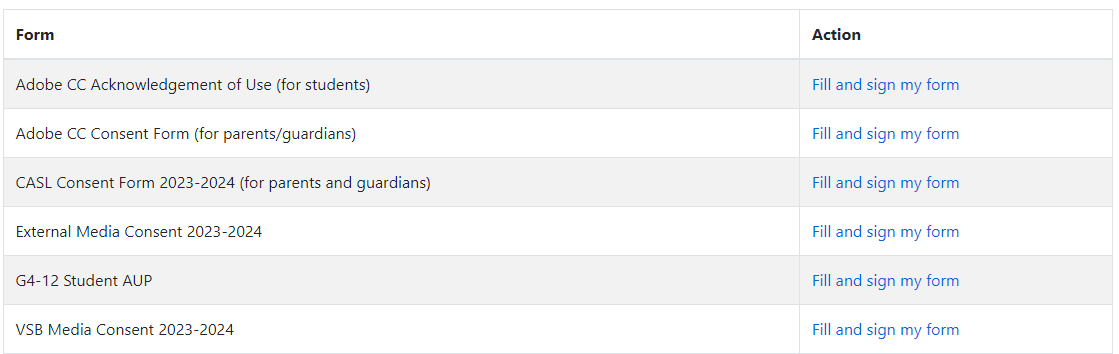
There are six online forms that need to be filled out and completed at the beginning of the school year.
1. Adobe CC Acknowledgement of Use (For Students)
2. Adobe CC Consent Form (for parents/guardians)
3. CASL Consent Form 2023-2024 (for parents/guardians)
4. External Media Consent 2023-2024
5. VSB Media Consent 2023-2024
6. G4-12 Student AUP
Sign in on to this website: http://myforms.vsb.bc.ca using your child’s PEN # and Date of Birth

Step 2:
Click on Each form where it says Fill and Sign my form:
Step 3:
Once you have selected a form, please read each form carefully.
Scroll to the bottom of each form and you will have to check off the box ‘I Agree’.
(by clicking on the ‘I Agree’ box you are giving your consent).
OR
Revoking consent is as simple as clicking the ‘Revoke’ button. You will then be brought back to the main page.
Step 4:
Click Submit