



Student Attendance & Absence Notification
Classroom teachers record student attendance, absences, and lateness for each class in MyEd BC. If a student has an unexcused absence, an email notification is sent to the parent/guardian each day.
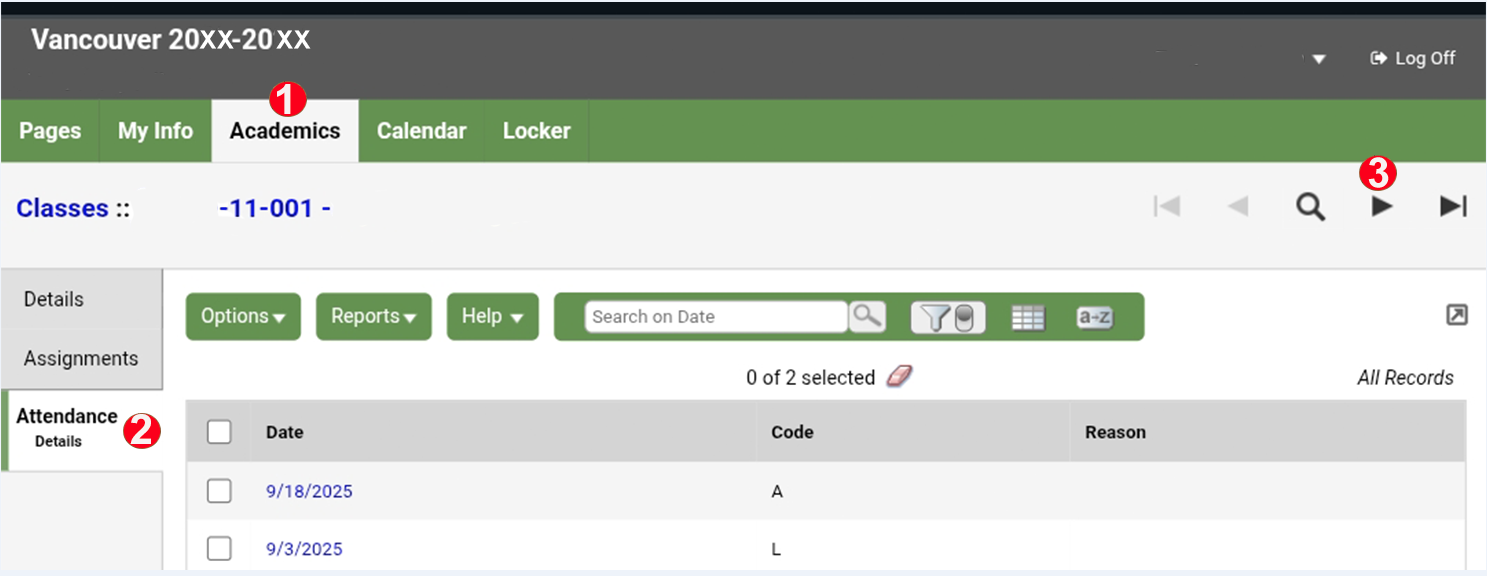
To view detailed attendance records in MyEd BC, sign in to the student's MyEd account. If you are seeing the mobile version, switch to Full Site view.
- Select the Academics tab at the top of the page.
- Select the Attendance Details tab from the side menu.
- Use the arrow buttons to navigate through the records.
You will be able to see the date and attendance code for each attendance entry listed under each class. This allows you to review absences, late arrivals, and other attendance-related records by course and date.
Absence Reporting
If a student is absent due to illness, an appointment, vacation, or any other reason causing an excused absence, a parent or guardian should email thomattendance@vsb.bc.ca and the student’s teacher(s) with the following information:
- Student's first and last name
- Student number
- Grade
- Date(s) of absence
- Reason for absence (illness, appointment, vacation, etc.)
The school accepts email notifications from a parent or guardian using an email address that is registered in the student information system. Once the sender's email address has been verified, the student's attendance record will be updated to show an excused absence.
Correction of Attendance Record
If you believe an attendance record is incorrect, contact the attendance office and the student's teacher(s) as soon as possible with the relevant details so the record can be reviewed and corrected if necessary.
Field Trips or School Events
When students are absent from class due to activities such as field trips, athletic tournaments, school competitions, performances and any other approved school events, teachers typically provide the school office with a list of participating students. The office then authorizes these absences in the attendance system. No absence email from a parent/guardian is required for these school-related absences, as they are recorded and approved by the school.
Signing Out During School Hours
If a student becomes ill or needs to leave school for an appointment during the school day, they must:
- sign out at the school office before leaving, and
- obtain parent/guardian permission or have a parent/guardian provide an absence email in advance, as students will only be released with parental authorization.
Extended Absence for Vacation
Students who plan to take an extended vacation during the school year must complete an Extended Absence for Vacation Notification form. The form requires signatures from the student's parent/guardian, teachers and counsellor.
Parents and students can either download and complete the fillable notification form from the school website or pick up a paper copy from the school office.
Late Return from Summer Break
Students planning to return to school from summer break later than Friday, September 11, 2026 noon and prior to Tuesday, September 29, 2026 must notify the school administration before Friday, September 11, 2026 noon of their late return by emailing a completed Notice of Late Return to David Thompson.
Should a student's attendance in school remain unverified by Friday, September 11, 2026 noon, the student's space will become open to another student on the school's waitlist. Please note that space will not be held beyond Tuesday, September 29, 2026.
